
The 7 Best ChessBase Alternatives for Mac in 2026
ChessBase is Windows-only and its official Mac guidance dates to 2018. Here are the seven realistic alternatives for Mac users in 2026, fairly compared.
TL;DR: For Mac users in 2026, the strongest ChessBase alternatives are HIARCS Chess Explorer Pro (the only native Mac product that reads ChessBase CBH/CBV databases and CTG opening books, $79.95–$169.95 one-time), Manifest Chess Studio (modern native database and analysis app, €129 one-time, the only tool on the list available from the Mac App Store, and the best paid pick for players who don't need CBH files; the €19 Manifest Chess Lite PGN reader sits alongside it for casual use), and En Croissant (a solid free alternative: open-source, native Apple Silicon, multi-engine, though development has been intermittent in 2026). ChessX is the long-running free fallback. Lichess Studies and Chess.com Analysis cover most of the workflow on the web. To run ChessBase itself, Parallels Desktop with Windows 11 ARM is the realistic path on Apple Silicon.
Key Takeaways
- ChessBase has no native Mac version in 2026. The vendor's own Mac tutorial was last updated in June 2018 and never mentions Apple Silicon. Boot Camp is not possible on M-series Macs.
- HIARCS Chess Explorer Pro is the only commercial native-Mac product that actually reads ChessBase CBH and CBV database files and CTG opening books. If you have a legacy ChessBase library, it is the unique answer.
- Manifest Chess Studio is the best paid pick for players who don't need CBH files: position search, local Stockfish 18, automated review, a find-the-move trainer, and Lichess and Chess.com sync, for €129 one-time. Manifest Chess Lite (€19 one-time) is the casual pick: a fast offline PGN reader. They are the only apps on this list installed from the Mac App Store.
- For free, En Croissant is a solid native Mac chess database: modern UI, native Apple Silicon, multi-engine analysis. Its development comes in bursts: no commits landed on the main branch from late April to early September 2026, then v0.15.1 shipped on September 5. ChessX is the long-running fallback. Neither reads ChessBase's proprietary CBH format.
- To keep using ChessBase itself, Parallels Desktop running Windows 11 ARM is the realistic path on Apple Silicon. The community confirms ChessBase 17 with Mega Database, Fritz 18, and even DGT eBoard passthrough all work. Wine and CrossOver are not viable for current ChessBase versions.
Why ChessBase doesn't run on Mac in 2026
ChessBase has been Windows-only for thirty-plus years. The vendor's own Mac tutorial (the page users land on if they Google "ChessBase Mac") was published on June 25, 2018. It discusses ChessBase 14 and Fritz 16. It does not mention Apple Silicon, M1, M2, M3, or M4 anywhere.
That tutorial recommends three paths to run ChessBase on a Mac: Boot Camp, Parallels, or VMware Fusion. Two of those are no longer relevant. Boot Camp does not exist on Apple Silicon Macs. Apple removed it with the M-series transition, and Intel Macs are a shrinking minority of the installed base in 2026.
So a Mac user looking at ChessBase today has three real choices: run it inside a Windows virtual machine on their M-series Mac, pick a native Mac alternative, or move the workflow to the web. This article ranks the seven realistic options, then walks through which one fits which use case.
The Mac chess landscape is actually in better shape than it has been in years. A modern native commercial product shipped in 2025–2026, two free open-source GUIs shipped releases this year, and the web platforms now cover more of the everyday workflow than they did even two years ago. The hard part isn't finding an alternative. It's picking which one.
The 7 alternatives at a glance
| # | Tool | Type | Apple Silicon | Reads CBH | Pricing | Best for |
|---|---|---|---|---|---|---|
| 1 | HIARCS Chess Explorer Pro | Native macOS | Via Rosetta 2 | Yes (CBH, CBV, CTG) | $79.95–$169.95 one-time | Opening legacy ChessBase libraries on Mac |
| 2 | Manifest Chess | Native macOS | Yes | No (PGN) | €19 or €129 one-time | Two apps (Lite and Studio): the best paid pick if you don't need CBH files |
| 3 | En Croissant | Native macOS | Yes | No (PGN) | Free (open source) | A free, modern native option |
| 4 | ChessX | Native macOS | Yes (via Rosetta) | No (PGN) | Free (open source) | A mature free open-source GUI |
| 5 | Lichess Studies + Opening Explorer | Web | n/a | No (PGN) | Free | Studies, opening explorer, broadcasts, all in a browser |
| 6 | Chess.com Analysis + Game Review | Web | n/a | No (PGN) | Freemium | AI-narrated review of your own online games |
| 7 | ChessBase via Parallels Desktop | Windows in a VM | Yes (via Win 11 ARM) | Yes (native) | ~€650 all-in for year one | Keeping the actual ChessBase workflow |
To make this list, a tool had to be (a) actually available on Mac in 2026, including via virtualization, (b) actively maintained or actively used, and (c) capable of covering at least part of the ChessBase workflow: storing a library of games, analyzing positions with a strong engine, or preparing openings. Tools that haven't shipped a release in two-plus years, tools that don't ship a Mac binary, and tools whose Mac story is "compile it yourself" are summarized in the also-rans section further down.
1. HIARCS Chess Explorer Pro: the only native Mac app that reads ChessBase CBH
HIARCS Chess Explorer Pro is the unique answer to one very specific question: "I have a folder full of ChessBase CBH files and I'm on a Mac. What do I do?"
Versioning and Mac support. Version 1.5.2, released April 2026, is the current build per the HIARCS Mac product page. It runs on every Apple Mac (Intel, ARM, and M-series) on macOS 10.14 Mojave through the latest macOS 26 Tahoe. M-series support is delivered via Rosetta 2 rather than a fully native arm64 binary. The April 2026 release notes called out "improved support for ChessBase symbols on CBH/CBV import and improved support for ChessBase CTG books," which is the vendor showing that the ChessBase interop layer is actively being maintained, not coasting on a 2018 codebase.
ChessBase compatibility. This is the headline. The product page explicitly states it "reads ChessBase CBH/CBV/CTG," meaning HIARCS can open native ChessBase database files and ChessBase-format opening books. Support is read-only; the vendor does not advertise CBH write support. The format conversion is one-way: bring your CBH library in, work with it inside HIARCS, then export to PGN if you want to share it.
Features beyond CBH compatibility. HIARCS Chess Explorer Pro is a full desktop chess database, not just a CBH reader. It handles PGN database management, opening tree generation across multiple databases, position search, and game annotation. Input formats include PGN, HIARCS's native HCE format, PDF, EPUB, and HTML, a broader input range than the PGN-only native Mac competitors. The bundled HIARCS commercial engine has been a fixture of computer chess for decades, and users can install additional UCI engines (Stockfish, Komodo, Leela Chess Zero) alongside it.
Pricing. One-time, three tiers (no subscription):
- Single-Core: $79.95 / €74.95
- Multi-Core: $119.95 / €99.95
- Premium: $169.95 / €149.95
Honest tradeoffs.
- Apple Silicon support is via Rosetta 2, not a native arm64 binary. Practically fine; philosophically not what some users want.
- The UI is older-school. Functionality is there; the feel is 2010s desktop.
- One-time licensing is appealing if you hate subscriptions, less appealing if you want guaranteed continuous updates over a long horizon. HIARCS does update; you just buy the next major release when it appears.
Best for: anyone with a serious legacy ChessBase library on Mac who doesn't want to set up Parallels Desktop, and anyone who specifically values the CTG opening book format.
2. Manifest Chess Studio and Lite: the best paid alternative if you don't need CBH
Manifest Chess makes the two newest native entrants in this category, each a one-time purchase on the Mac App Store, and they are built on a philosophy nothing else on this list shares: everything comes in the box. Stockfish 18, the strongest chess engine in the world, is bundled and already configured. Import, position search, game review, and online-account sync are built in rather than bolted on. There is nothing to download separately, no UCI paths to point at binaries, no account needed to get started, and updates arrive through the App Store like the rest of your Mac software. Every other tool here asks you to assemble at least part of the workflow yourself; these two just work.
That is the right trade for the vast majority of Mac players. The exceptions are narrow: a legacy ChessBase CBH library (that is HIARCS, above) or a taste for assembling your own multi-engine toolkit (that is En Croissant, below). For everyone else, these are the only apps on this list designed Mac-first rather than ported across platforms, and it shows in the interface: next to the Qt-era free options, the gap is not close. Side by side:
 Manifest Chess Studio Manifest Chess Studio |  Manifest Chess Lite Manifest Chess Lite | |
|---|---|---|
| Price | €129 one-time | €19 one-time |
| In one sentence | The database: your whole chess life in one searchable library | The reader: any .pgn file on the board in a double-click |
| Search | Drop a position on the board and every matching game you own appears, with win/draw/loss numbers | Header filters within the current file |
| Engine | Stockfish 18 with lines, depth, threads, and memory under your control | Stockfish 18, capped at five lines |
| Review and training | Automated review with blunder detection, plus a find-the-move trainer built from your own mistakes | Manual analysis and annotation |
| Internet | Optional: a free account unlocks Lichess and Chess.com sync and the review queue; everything else runs offline | None: the app has no network features at all, and the App Store privacy label reads "Data Not Collected" |
| Made for | Players building and mining a lifetime game library | Anyone who just needs to open, replay, and annotate a PGN |
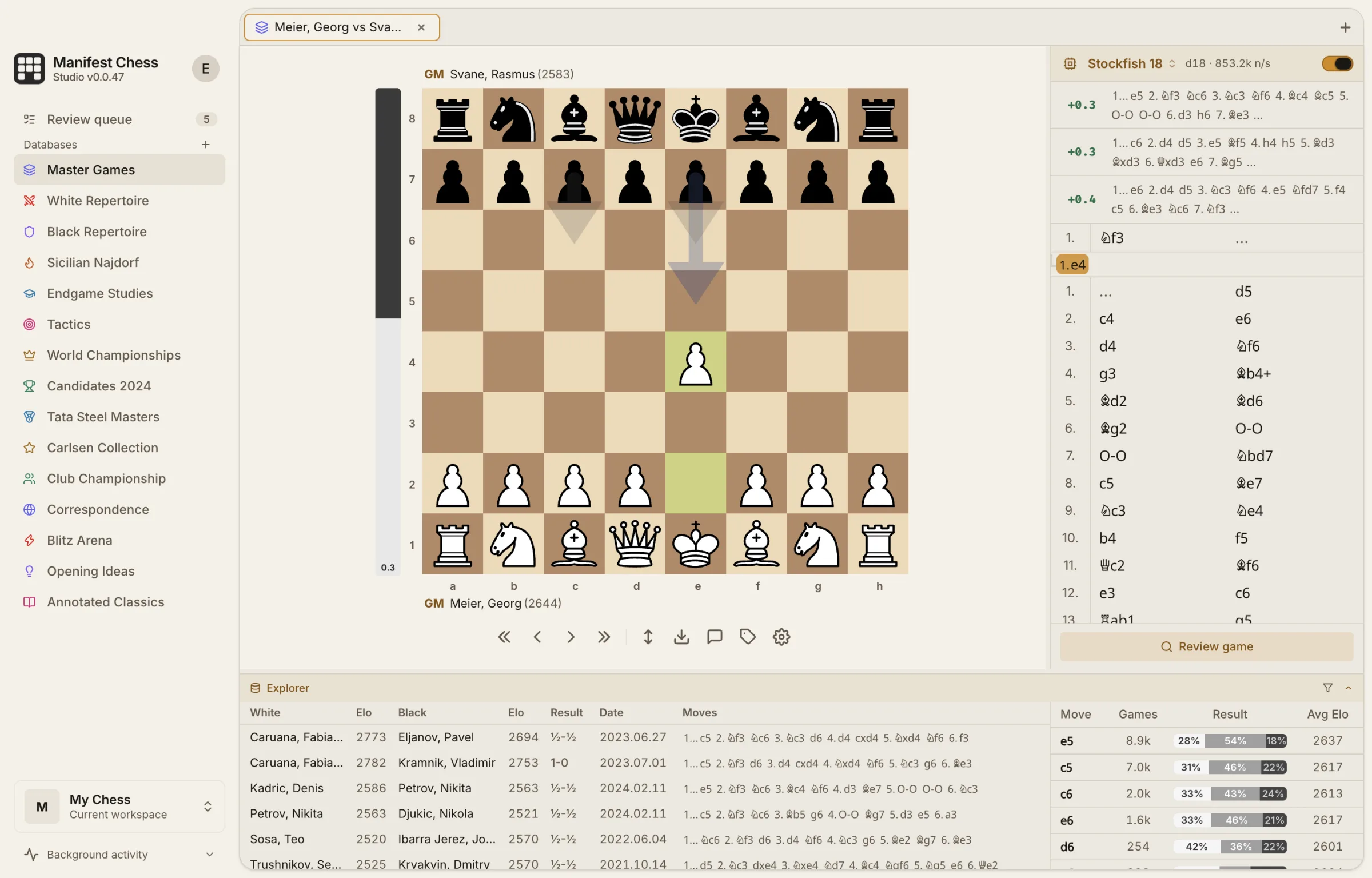 Manifest Chess Studio's position explorer: every game in the selected databases that reached the position on the board, with per-move win/draw/loss percentages and average Elo.
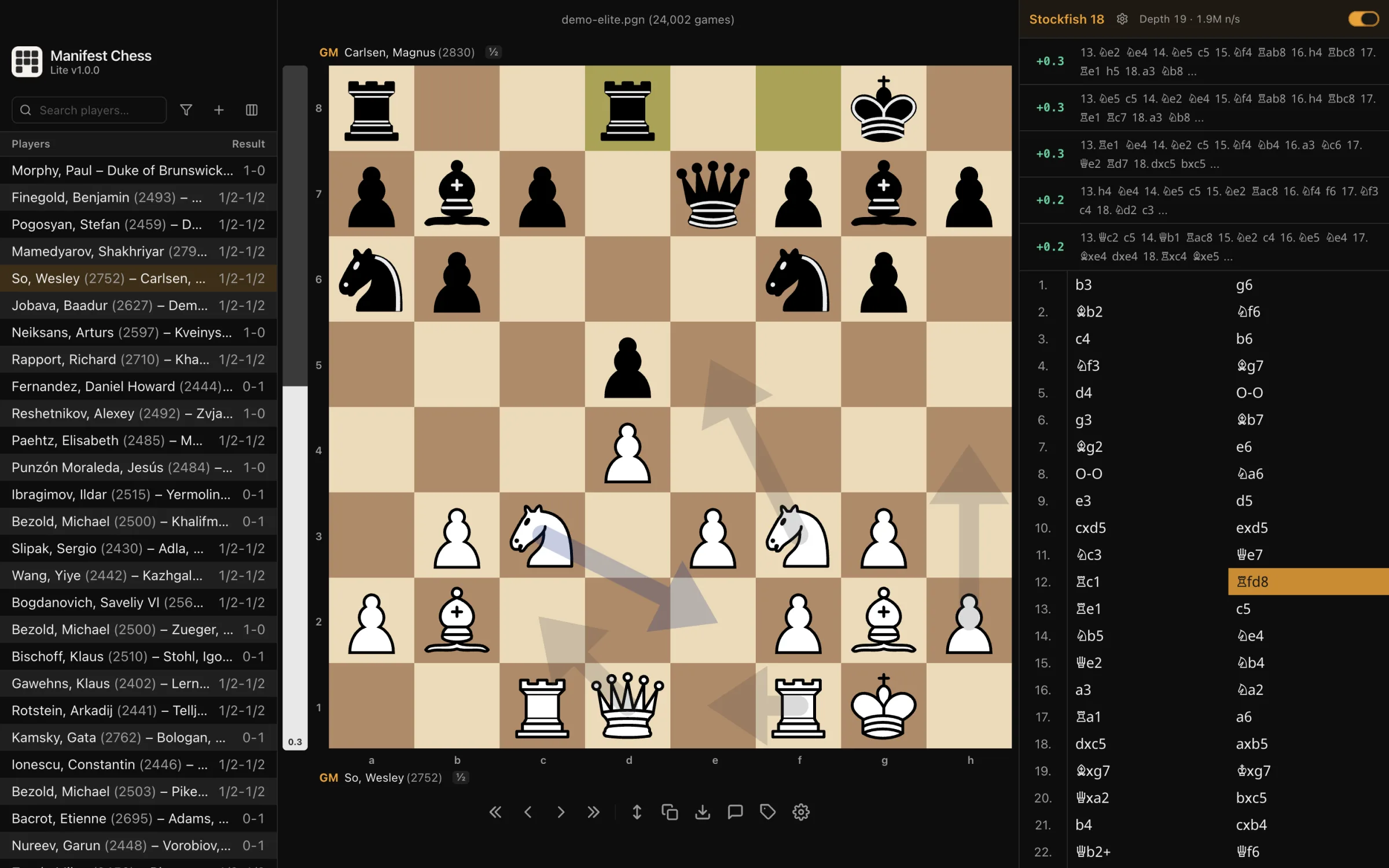 Manifest Chess Lite with a 24,000-game PGN opened straight from Finder: Stockfish 18 running locally at depth 19 with five lines and best-move arrows, no account anywhere.
€129 and €19 are the euro storefront prices; Apple sets the exact figure per region. Both are one-time purchases (the subscription model was retired in September 2026): no tiers, no in-app purchases, and no free trial, with refunds through Apple's standard App Store process. Manifest is the only entry on this list distributed through the Mac App Store; every other option is a direct download, a web app, or a build-it-yourself project. Both apps are GPL-licensed; the purchase buys the signed, notarized, ready-to-run build plus updates and support.
Beyond the table, Manifest Chess Studio also scouts opponents (pull any Lichess or Chess.com handle's games into a database of their own and filter by color, time control, rating, or date), imports Lichess studies and PGN files with millions of games, and exports any database back to PGN whenever you want out. Manifest Chess Lite registers a Quick Look preview, so pressing Space on a .pgn in Finder shows the game before you even open it.
Honest tradeoffs.
- No CBH support. PGN only: no ChessBase CBH or CBV files, no CTG opening books. Convert to PGN first, or use HIARCS Chess Explorer Pro alongside.
- Apple silicon only. There are no Intel Mac builds; Manifest Chess Lite requires macOS 12 or later.
- Stockfish 18 is the engine, full stop. The vendor does not advertise loading third-party UCI engines (Komodo, Leela Chess Zero), and there is no cloud engine tier. If multi-engine analysis matters to you, En Croissant and HIARCS both offer it.
- No endgame tablebases. No Syzygy, no online TB lookup.
- Online features are hosted. Sync and the review queue need the internet and a free account; the review queue sends only FEN position strings to the evaluation service.
- Mac-only today. Manifest Chess Studio for Windows and Linux is in private beta behind a waitlist.
What you give up versus ChessBase itself. No CBH, CBV, or CTG read or write. No Mega Database. No endgame tablebases. If any of those matter for your workflow, HIARCS or Parallels-plus-ChessBase is the answer, not this.
Best for: most Mac players: anyone starting from PGN who wants one paid, vendor-supported app handling library, analysis, game review, and online-game sync. Casual players who just want to open, read, and annotate PGN files are best served by Manifest Chess Lite, the cheapest native option on this list that isn't free. If you have CBH files, see HIARCS above.
3. En Croissant: a solid free alternative for Mac
En Croissant is a free, open-source chess database and analysis GUI, with native builds for Windows, macOS, and Linux. It is a solid free option in this category: native Apple Silicon, a clean modern UI, and the widest engine flexibility on this list's free tier, with one-click installs of Stockfish and support for Komodo, Leela Chess Zero, or any UCI engine.
Feature coverage.
- One-click installation of UCI engines (Stockfish, Komodo, and others)
- Multi-engine analysis with unlimited depth
- Direct import of games from Lichess accounts
- Opening database with move statistics
- Game analysis with move markings and evaluations
- Repertoire practice
Development pace. This is the part of the picture that has changed since this guide was first published, so here is the plain record. En Croissant's development comes in bursts rather than a steady weekly cadence. A very active stretch from November 2025 through March 2026 (roughly 500 commits and seven releases, ending with the feature-heavy v0.15.0 on March 17, 2026) was followed by four and a half months with no commits to the main branch, from April 20 to September 5, 2026. In late August a "project status" issue on the repo asked whether development had stopped; the maintainer replied that he had "been inactive on this repo for a while but that doesn't mean the updates have ended" and offered to take on co-maintainers. A catch-up burst followed in early September 2026: v0.15.1 shipped on September 5 (translation fixes and small bugfixes), and a backlog of pull requests was merged, some of which had waited since April. Community forks, notably Pawn Appétit, appeared during the quiet months. The project stands at 1,800+ stars and 75 contributors on the En Croissant GitHub repo as of September 2026.
None of this changes what the app already is, and that is a lot: a UI notably cleaner and more modern than ChessX or the SCID family, particularly for Lichess workflows where account import and game analysis flow naturally, and the closest the free open-source category has come to the polished, modern feel of Manifest Chess Studio. What the bursty cadence does mean is that a bug fix may arrive with the next burst rather than next week, and that the project's pace depends heavily on one lead maintainer's availability.
Cross-platform parity. The same build runs on Mac, Windows, and Linux without major feature differences, which matters if you switch between machines or want to share a workflow with users on other platforms.
Honest tradeoffs.
- Same structural gap as Manifest Chess and ChessX: PGN only, no native CBH read or write.
- Some macOS users have reported that the Komodo engine download fails; Stockfish works.
- Polish on edge-case features (repertoire practice, certain analysis views) trails the paid options, and with the bursty release cadence, rough edges can stay unsanded for months. The last feature-focused release was v0.15.0 in March 2026.
- Maintenance is volunteer-driven and currently single-maintainer-led; read the development-pace section above before making it the center of a workflow you depend on.
- No automatic backups. If your PGN files are precious to you, set up your own Time Machine, rsync, or Git-based backup.
Best for: anyone who wants a capable free native Mac chess database, and anyone who wants multi-engine analysis without paying for HIARCS. Native Apple Silicon, a modern UI, and any-UCI-engine support make it the most modern-feeling of the free options, and the September 2026 release shows the project is alive. Go in knowing the cadence: this is a free community project that moves in bursts, not a vendor with a support queue. ChessX is the fallback if you prefer a traditional Qt GUI.
4. ChessX: the long-running free open-source choice
ChessX is the mature open-source alternative, the kind of long-running community passion project that has been quietly shipping on SourceForge for years. Version 1.6.10 shipped on March 12, 2026, including a macOS .dmg, with active Mac packaging commits and a dedicated mac_osx build directory at the root of the official repo. There is no vendor, no support contract, and no cloud anything: it's a free, open-source GUI that you install, configure, and run on your own terms.
What it does.
- Load and save PGN files
- Analyze positions using UCI and Winboard/Xboard chess engines
- Display a tree of moves for the current position (an opening tree)
- Search a database by text or by position
- Set up boards, copy and paste FEN, edit annotations and variations
The Mac story. Healthy. A March 2026 commit titled "Fix Mac specific command" and a January 2026 commit titled "Prepare new installer for Mac OS" in the official ChessX repo indicate the Mac build target is being maintained, not coasting. The most recent push to the repository was 2026-05-06.
Honest tradeoffs.
- The UI is functional but feels two decades old. ChessX is Qt and proud of it.
- No native CBH read or write. PGN only.
- Apple Silicon support depends on the Qt build; the upstream Mac installer should work on M-series via Rosetta 2.
- No automatic cloud backup. A corrupted PGN file or a dead SSD is your problem to recover from, which means you need your own backup discipline.
Best for: Mac users who want a free, mature, traditional Qt-based GUI and don't need the freshest features. ChessX has been quietly shipping for years and remains a viable choice if you prefer stability over modernity, or if you already have a ChessX workflow you'd rather keep than migrate.
5. Lichess Studies and Opening Explorer: the free web workflow
Lichess covers more of the ChessBase workflow as a free web service in 2026 than it did even two years ago. For solo players whose workflow is "open a position, see the explorer, save the line in a Study, follow tonight's broadcast," Lichess is the de facto default: free, fast, and Mac-native because it runs in your browser.
What competes with ChessBase.
- Studies. Multi-chapter PGN annotation environment with real-time collaboration. The most popular practitioner-attested ChessBase Studies replacement.
- Opening Explorer. Browser-based opening tree across Lichess games and a curated master database.
- Analysis board. Server-side Stockfish, with an evaluation graph and automatic blunder detection.
- Broadcasts. Real-time tournament following with live evaluation, used by the major OTB tournaments (Wijk aan Zee, Norway Chess, the Candidates) for live coverage.
- Database export. Lichess publishes its full game database monthly as PGN dumps under ODbL, free to download.
Honest tradeoffs.
- Studies are "almost impossible to search across multiple studies, lacking cross-study search functionality," which is the structural reason coaches managing dozens of student repertoires still prefer ChessBase or a desktop app.
- 64 chapters per Study. Lichess caps each Study at 64 chapters. A full repertoire with both colors and many side lines blows through that limit fast, which forces you to split a single repertoire across multiple Studies. Combined with the lack of cross-Study search, this is the main structural reason serious opening prep on Lichess gets unwieldy at scale. If you have hit this wall, it is exactly the gap a desktop app fills: Studies export cleanly to PGN, Manifest Chess Lite (€19) opens those exports offline for reading and annotating, and Manifest Chess Studio's position search works across every exported Study at once.
- Browser-based, so no real offline work.
- You don't own your data the way you do with a desktop database.
Best for: solo amateur and club players. This is the everyday-workflow answer for the largest segment of Mac chess players in 2026.
6. Chess.com Analysis and Game Review: the mainstream web option
Chess.com is the strongest competitor for the "look at my own games, get an AI review, and grind tactics in one app I'm already in" workflow.
What competes with ChessBase.
- Analysis board with server-side Stockfish.
- Opening explorer with approximately three million master games from titled players.
- Game Review. AI-narrated post-game analysis with calibrated commentary. The closest single-product competitor to ChessBase's "Let's Check / cloud analysis" feature for typical online players.
- Game archive of every game you have played, with optional auto-analysis.
- Lessons and Puzzles features for training, including spaced-repetition-style review on Diamond.
Pricing. Freemium. Free tier covers basic analysis; Premium tiers (Gold, Platinum, Diamond) unlock deeper Game Review use, advanced filters, lessons, and more. Diamond is approximately $99/year.
Honest tradeoffs.
- The Chess.com explorer's ~3M master-game DB is smaller than ChessBase's 8–11M-game Mega Database, but it is curated for tournament games.
- Browser-based, so the same caveats apply as Lichess: no offline, your data lives there.
- The platform is freemium and constantly upsells.
Best for: players who already live in Chess.com, want their game archive and AI Review in one place, and don't need an explorer that goes as deep as ChessBase's Mega.
7. ChessBase itself, via Parallels Desktop on Apple Silicon
For users who refuse to leave ChessBase, Parallels Desktop is the realistic path on Apple Silicon in 2026. The community reality on M-series Macs (per a long-running TalkChess practitioner thread) is much better than the vendor's stale 2018 tutorial suggests:
- ChessBase 17 with Mega Database is confirmed working on Apple M1 and M2 via Parallels Desktop.
- Fritz 18 and ChessOk Aquarium are also confirmed working on Apple Silicon via Parallels.
- DGT eBoard USB passthrough through Parallels works.
- Stockfish on Win 11 ARM via Parallels on M-series gets approximately 5,000–6,000 kNPS on 10 cores per the same TalkChess thread, a real but bearable performance penalty versus a native Windows desktop.
- Parallels on M-series is reported as actually better at running ChessBase than running ChessBase on Intel Macs natively, because of the M-series chips' raw performance.
The all-in cost stack for year one.
- Parallels Desktop Pro: ~$120/year (or Standard one-time at ~$100).
- Windows 11 ARM license: ~$140 one-time.
- ChessBase 17 Premium: ~€300; subsequent Mega Database ~€189.
- Practical RAM floor: 8 GB; recommended 16 GB.
What does not work in 2026.
- Boot Camp. Not possible on Apple Silicon at all.
- Wine and CrossOver for current ChessBase versions. ChessBase 12 was unreliable under Wine and older ChessBase 9 ran "reasonably well," per GM David Smerdon's writeup. CrossOver's most recent ChessBase entry is its ChessBase 15 compatibility page, which predates the Apple Silicon transition. Treat Wine and CrossOver as not viable for ChessBase 17 or 18 in 2026.
- VMware Fusion 13 on Apple Silicon technically supports ARM Windows, but practitioner reports describe it as less effective than Parallels for chess workloads.
Best for: users who need Mega Database, deeper opening prep than any native Mac tool delivers today, and who accept the ~€650 first-year all-in cost plus a Windows VM in their menu bar.
What we left off the list, and why
A few tools that come up often in older Mac-chess threads but didn't make our top seven for 2026:
- Scid vs. PC. Latest release v4.27 in June 2026. Mac builds are still 32-bit by default; the 64-bit builds live in a separate SourceForge directory and are explicitly labeled "unsupported" by the maintainer ("64-bit Mac Tcl is just too buggy"). No native Apple Silicon build. Workable if you already have a Scid workflow you're determined to keep, but ChessX is a better open-source choice for a new Mac user.
- Original SCID (benini/scid). Actively maintained upstream, with a Scid.app build script and first-class Mac support, but Apple Silicon native compatibility is not explicitly stated, and the community is smaller than ChessX's. A reasonable parallel free choice if you prefer the original codebase to the fork.
- BanksiaGUI. Still ships a separate Apple Silicon native build (more than Scid vs. PC offers). But the versions history shows the most recent release is v0.58 (RC1) from January 2023, over three years stale as of mid-2026. Use only if its current feature set happens to match what you need.
- Cute Chess. No macOS binary in the official v1.4.0 release. Mac users have to build it themselves against Qt 5.15+ or Qt 6. Also, Cute Chess is an engine-match runner, not a database manager, so it doesn't really compete with ChessBase on opening prep.
- Lucas Chess on Mac. Upstream is Windows-only with no macOS packaging. The community Mac fork hasn't been touched since December 2024 and has zero stars, zero forks, and zero published releases. Effectively not available on Mac in 2026.
- Deep Shredder 13 for Mac. The Shredder vendor page advertises a playable engine and a simple GUI, but does not advertise database management, PGN handling, or ChessBase compatibility. As a play-and-analyze tool it is fine; as a database tool it doesn't compete.
- Forward Chess. Interactive ebook reader for chess books from Quality Chess, New In Chess, and Thinkers Publishing. A popular Mac chess utility, but not a database or analysis tool. Complement, not alternative.
- DecodeChess. AI-narrated post-game analysis (freemium). Useful for "why was this move bad" explanations on top of Stockfish, but not a database or opening-prep tool.
- Chess King for Mac. Legacy commercial product line. No recent public release activity visible in 2025 or 2026. Treat as status uncertain rather than recommended.
- chess24. Acquired by Chess.com via the Play Magnus Group in 2022; features have been folding into chess.com. Don't build new workflows around it.
Which one should you pick?
The right alternative depends on what you actually need to do:
You have a legacy ChessBase library in CBH files. Either HIARCS Chess Explorer Pro for native reading on the Mac, or Parallels Desktop + Windows 11 + ChessBase itself if you also need Mega Database access. If you decide to leave CBH behind, convert your critical files to PGN once so you can also work with them in Manifest Chess, En Croissant, or ChessX.
You're a serious player starting fresh on Mac. Two paths, depending on what you value.
- You want one paid, vendor-supported app, hands-off: Manifest Chess Studio. The most complete modern paid workflow on PGN, with library, position search, automated review, Lichess/Chess.com sync, and local Stockfish 18 analysis built in, for €129 one-time from the Mac App Store. Tradeoffs: Apple silicon only, Stockfish only, no endgame tablebases.
- You want free: En Croissant. Native Apple Silicon, multi-engine (Stockfish, Komodo, Lc0, any UCI build), free and open source, works offline. ChessX is a long-running fallback if you prefer a traditional Qt-based GUI. Tradeoffs: volunteer project with a bursty release cadence (nothing shipped between March and September 2026), you manage your own backups, occasional rough edges.
You're a casual player who just wants to open and study PGN files. Manifest Chess Lite at €19 one-time: double-click a .pgn and it is on the board, fully offline, with Stockfish 18 built in. Lichess's analysis board is the free browser route if you don't need a native app.
You live in your browser already. Lichess Studies and Opening Explorer for opening prep and broadcasts; Chess.com for game archive and AI Review. Free or freemium. Most of the everyday ChessBase workflow, covered without a single download.
You insist on the actual ChessBase product. Parallels Desktop + Windows 11 ARM + ChessBase. Practitioner reports confirm it works well on M-series Macs in 2026, including ChessBase 17, Mega Database, Fritz 18, and DGT eBoard passthrough. Budget ~€650 for the first year and live with a Windows VM in your menu bar.
The three native-Mac picks compared
| Feature | HIARCS Chess Explorer Pro | Manifest Chess | En Croissant |
|---|---|---|---|
| Pricing | $79.95–$169.95 one-time | €19 (Manifest Chess Lite) or €129 (Manifest Chess Studio), one-time | Free (open source) |
| Mac App Store | No | Yes | No |
| Apple Silicon | Via Rosetta 2 | Native (Apple silicon only) | Native |
| Reads ChessBase CBH / CBV / CTG | Yes (read-only) | No | No |
| PGN import | Yes (plus HCE, PDF, EPUB, HTML) | Yes | Yes |
| Engine support | HIARCS engine plus UCI engines | Stockfish 18, bundled | Stockfish plus any UCI engine |
| Lichess and Chess.com auto-sync | No | Yes (Manifest Chess Studio, with free account) | Lichess game import |
| Offline use | Yes | Yes (sync and review need internet) | Yes |
| Open source | No | Yes (GPL) | Yes (GPL) |
| Best for | Legacy ChessBase libraries on Mac | The paid pick for PGN workflows | Solid free native option |
The bottom line
Mac chess software in 2026 is in better shape than it has been in years. There's a modern native commercial lineup (Manifest Chess Studio, with the Manifest Chess Lite reader alongside), a CBH-compatible native commercial product (HIARCS Chess Explorer Pro), two free open-source GUIs that both shipped releases in 2026 (ChessX and En Croissant), and two free web platforms (Lichess and Chess.com) that together cover most of the everyday workflow. ChessBase itself remains Windows-only, and on M-series Macs now requires Parallels Desktop and Windows 11 ARM, but the practitioner reports say that path is more bearable than the vendor's 2018 tutorial would suggest.
If you specifically need to read CBH, CBV, or CTG files on Mac without a Windows VM, HIARCS Chess Explorer Pro is the pick. For everyone else, which is most Mac players, Manifest Chess Studio is the best paid pick: the most complete modern PGN workflow at €129 one-time, and the only tool here you can install from the Mac App Store. The €19 Manifest Chess Lite is the cheapest paid app on the list and the casual pick. If you want a free alternative, En Croissant is a solid choice: open source, native on Apple Silicon, multi-engine, with the caveat that its development moves in bursts and paused for much of mid-2026 before resuming in September. The rest of the field (ChessX, Lichess, Chess.com, Parallels with ChessBase) is where you fall back depending on budget, workflow, and how attached you are to the original product.
Frequently Asked Questions
Related articles
Disco Chess vs ChessTraining.app: Two Free Chess Training Platforms Compared
Both platforms offer woodpecker method training for free. Disco Chess covers tactics, openings, and game-based training; ChessTraining.app adds endgames, visualization, and recall.

Disco Chess vs Chessable: Which Chess Training Platform Is Right for You?
Two chess training platforms compared: Disco Chess uses cycle-based repetition for tactics and openings; Chessable uses MoveTrainer spaced repetition across a massive course library.

Disco Chess vs ChessTempo: Repetition Training vs Infinite Puzzles
Two different philosophies for chess tactics training: repetition-based mastery vs adaptive variety. Here's how they compare.


 Join our community